

Showing posts with label cmd. Show all posts
Showing posts with label cmd. Show all posts
Sunday, 11 October 2015
Just hold down the Shift key and right-click on the desktop.

And then you can choose “Open Command Window Here” from the menu. The great thing about this is that the current path is the desktop, which is convenient for manipulating files on the desktop.
Of course you can always right-click on any folder icon in the system while holding down the shift key.
If you want to hide a folder named ABC in your C drive.
Just follow the steps as given below :-
STEP 1: Goto Run and type cmd.

STEP 2: Type this code attrib +s +h C:\ABC and press ENTER

Try It To Your Own PC
Where:
C:\ :Drive name
ABC: Folder name
+h = to hide the folder
+s = to list it as system file - so the hidden will be protected by system
STEP 3: If you want to make that folder appear then...
STEP 4: Type this code attrib -s -h C:\ABC
Enjoy.
 LIST OF SOME DOS COMMANDS
First of all open command Prompt
Go to start> run> cmd
1. To create a new directory.
Command:
C:\>mkdir hack
Or
C:\>md hack
[hack is your directory name]
2. To remove a directory.
Command:
C:\>rmdir hack
Or
C:\>rd hack
[hack is your directory name].
3. To clear the screen.
Command:
C:\>cls
4. To see the contents or subdirectory of directory.
Command:
C:\>dir
Or
C:\>dir /p
[“dir /p” to see page by page].
Or
C:\>dir /a
[“dir /a” to see all directories+hidden directories].
Or
C:\>dir /ah
[“dir /ah” to see only hidden directories].
5. To change the directory.
Command:
C:\>cd hack
[hack is your directory name].
C:\>cd..
[cd followed by 2 periods takes you one level up i.e to the parent directory]
C:\>cd\
[cd followed by backslash periods takes you to the top directory i.e directly under the drive]
6. To rename a directory or file.
Command:
C:\>ren hack hacknew
[By this command the folder hack is rename to hacknew].
7. To move a file from one destination to another.
C:\>move sourcepath destinationpath
Command:
C:\>move C:\hack.txt D:\
[hack.txt is your directory name].
8. To create a new file.
Command:
C:\>copy con hack.txt
[Once you create the file press enter and type the information inside the file.
To save the file hold CTRL and press Z . This will return ^Z. Once this has been entered press enter to save and exit the file.].
[hack.txt is your file name].
9. To see the content of a text file.
Command:
C:\>type hack.txt
[hack.txt is your file name].
10. To delete a file.
Command:
C:\>del hack.txt
[hack.txt is your file name].
11. To edit a file.
Command:
C:\>edit hack.txt
[hack.txt is your file name].
12. To copy a file from one destination to another.
C:\>copy sourcepath destinationpath
Command:
C:\>copy C:\hack.txt D:\
[hack.txt is your file name].
13. To copy a directory from one destination to another.
C:\>xcopy sourcepath destinationpath /s
Command:
C:\>xcopy C:\hack D:\ /s
[hack is your directory name]
14. Exit from command prompt.
Command:
C:\>exit
Friday, 2 January 2015
So Here Is A Trick Now U Can Chat With Your Friend Through Command Prompt..
- You need only your friend IP address..
- Open Notepad and write this code!
- @echo off
:ACls
echo MESSENGER
set /p n=User:
set /p m=Message:
net send %n% %m%
Pause
Goto A
Save this as "Messenger.Bat".
Open Command Prompt.
Drag this file (.bat file) over to Command Prompt and press Enter.
You would then see something like this..

Now, type the IP Address of the computer you want to contact and press enter
You will see something like this:
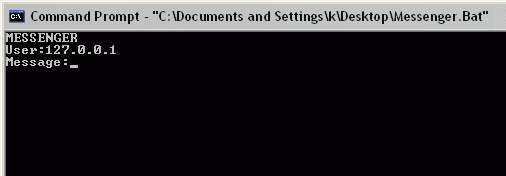
Now Only you have to type the message and press enter... Enjoy!!
Subscribe to:
Posts (Atom)
Popular Posts
-
 1. First go to Flip Text 2. Then Enter your text. 3. Then Copy your stuff.
 -
Note: This Article Is Not For Noobs! Learners Are Welcomed! This Article Is For Educational Purposes Only, Any Misuse Of Information Give...
-
SyntaxNet: Neural Models of Syntax. Installation Running and training SyntaxNet models requires building this package from source. Yo...
-
 Just hold down the Shift key and right-click on the desktop. And then you can choose “Open Command Window Here” from the menu. T...
 -
First Stuff is "LOGS". You need to know how events, application, and system logs work. If you don’t, you can be easily caught by...
-
 Here is a simple trick for you that will enable the registry editor which is disabled by administrator. Just follow the steps as give...
 -
This article is a quick, comprehensive guide on setting up your newly installed KaliLinux2.0 (very attractive new GUI by the way) for secu...
-
 Just follow the steps as given below :- Insert your USB drive into your system and wait for it to be recognized.. STEP 1: Go t...
 -
WhatsApp, a widely used social messaging application can simply be crashed by specially crafted message sent to you from a friend. This ...
-
Here is a simple trick for you that will enable the registry editor which is disabled by administrator. Just follow the steps as give...


